The Self Assessment screen
What each figure means, how it maps to your tax return, and what the CSV and PDF exports contain.
Last checked 12/09/2026.
What it is
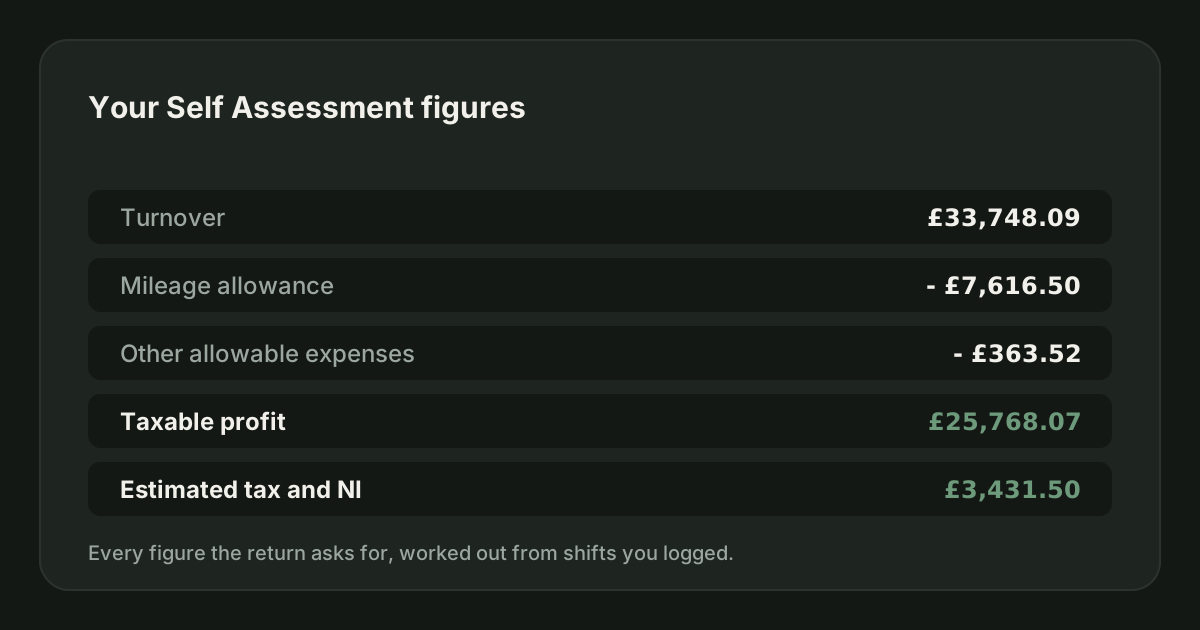
Your tax year summarised the way a tax return wants it: turnover, deductions, taxable profit, and the tax and National Insurance estimated on it.
The figures
| Line | What it is |
|---|---|
| Turnover | Everything the platforms paid you, including tips, across the tax year. |
| Mileage allowance | Your business miles at the approved rates, with the threshold applied. |
| Allowable expenses | Expenses in categories that reduce taxable profit. |
| Taxable profit | Turnover minus the two deductions above. |
| Income tax | Estimated on the profit, using the current bands. |
| Class 4 NI | Estimated on the profit. |
Fuel and vehicle insurance do not appear as deductions here. They are inside the mileage allowance, and deducting them again would be double-counting - see can I claim mileage and fuel.
With other income or a job
If you have logged other income, the screen carries on past the driving and works out your whole position, in the same order HMRC does:
| Line | What it is |
|---|---|
| Estimated tax on your driving | The income tax and Class 4 your driving adds, with the other income already underneath it. |
| Tax and Class 4 on all your income | Income tax on everything together, plus Class 4 on your trading profit only. Wages never pull driving profit into Class 4. |
| Less tax already deducted through PAYE | What your employer took off your payslips. A payslip refund shows as a plus instead. |
| Left to pay through Self Assessment | What is still owed once the PAYE tax is taken off. |
| Overpaid, HMRC owes you | Shown instead of the line above when PAYE took more than the year works out at. |
A PAYE entry saved before JoltMile asked for the tax deducted has no figure, so it is left out of the credit rather than guessed. The screen tells you how many there are. Open them under Other income and fill the figure in, or what is left to pay will read too high.
The CSV carries the same lines at the bottom, and the PDF explains them in its closing note.
The Class 2 decision
If your profit is under the Small Profits Threshold, a tick box asks whether you plan to pay voluntary Class 2 to protect your State Pension. The box comes first and the explanation sits behind the arrow beside it. Ticking it shows the yearly amount separately. It is never added to your tax, because Class 2 is not a tax charge.
The exports
The CSV contains the summary figures plus the rates and settings used to produce them, so an accountant can see not just the numbers but how they were reached. The PDF is a readable one-page summary with the same content.
Neither is a tax return. JoltMile does not submit anything to HMRC; you or your accountant file using these figures.
Before you rely on it
- Check every shift is logged, including any you meant to add later.
- Check your mileage rates match HMRC's current approved rates.
- Add any income from outside the driving under Other income. A PAYE job changes the tax, not the profit, and the screen can only credit PAYE tax it has been told about.
- Check the PAYE tax you entered against your P60 before you rely on a refund.
- Keep your records for at least 5 years after the January filing deadline.
Related
How JoltMile estimates your tax
Income tax and Class 4 National Insurance on your running profit, using the 2026/27 bands.
HMRC & taxUpdated 29/09/2026
Self Assessment for delivery drivers: the complete guide
Registering, what counts as income, what you can claim, how much tax you will owe and when it is due - written for UK delivery and courier drivers, correct for the 2026/27 tax year.
HMRC & taxUpdated 19/08/2026
Riding for Deliveroo: the full guide
How Deliveroo works for a rider: what you need to join, how each fee is worked out, the pay floor agreed with the GMB union, when the money arrives, the insurance Deliveroo gives you for free, and the parts that are left to you.
Getting startedUpdated 29/09/2026
Delivering for Uber Eats: the full guide
How Uber Eats works for a courier: signing up, how each delivery is paid, Quests and batched orders, the weekly pay cycle and the two ways to cash out early, the free Allianz cover, Uber Eats Pro, and the tax side.
Getting startedUpdated 29/09/2026
Delivering for Just Eat: the full guide
Just Eat works differently from the other food apps. You set your availability each week and are scheduled into delivery runs, each order pays Transit Pay, and your acceptance rate decides how quickly offers reach you. Here is how all of it fits together.
Getting startedUpdated 29/09/2026
Delivering for Evri: the full guide
Evri couriers are self-employed and paid per parcel, once a month. You choose between Evri Flex and Evri Plus, which trades a five-day commitment for holiday pay, a pension and guaranteed earnings. Here is how it works and what it means for your tax.
Getting startedUpdated 29/09/2026