The mileage and tax app for UK delivery drivers
Know what you actually earn.
Built forBuilt for Amazon Flex, Uber, Uber Eats, Deliveroo, Just Eat and Evri.
The first accounting software made for self-employed drivers. It tracks every mile, shows what each hour really paid, and has your tax figures ready when HMRC asks.

Your first 10 shifts are free.

Start shift
One tap to start. One tap to end.
No odometer photos, no typing miles into a notes app at midnight. Tap Start shift when you set off and JoltMile notes the time and the nearest postcode, then counts the miles for as long as you drive, whether that is forty minutes or four hours. Tap End shift and the end postcode and the miles are filled in.
- Start time and nearest postcode, captured as you set off
- Miles counted while the shift runs, however long it goes on
- Take a break and the clock and the miles both pause
- End postcode, business miles and your commute, filled in
- Keeps going with no signal and syncs when you are back
- Only the miles and two postcodes kept; raw positions thrown away
- taps to log the drive: Start shift and End shift
- 2taps to log the drive: Start shift and End shift
- a business mile for your first 10,000, at HMRC's approved rate
- 55pa business mile for your first 10,000, at HMRC's approved rate
- expense categories, each marked claimable or not
- 20expense categories, each marked claimable or not
- shifts free, to see your own numbers first
- 10shifts free, to see your own numbers first
The same app on iPhone and Android. See it on yours.
How it works
From the car park to your tax return, on your phone
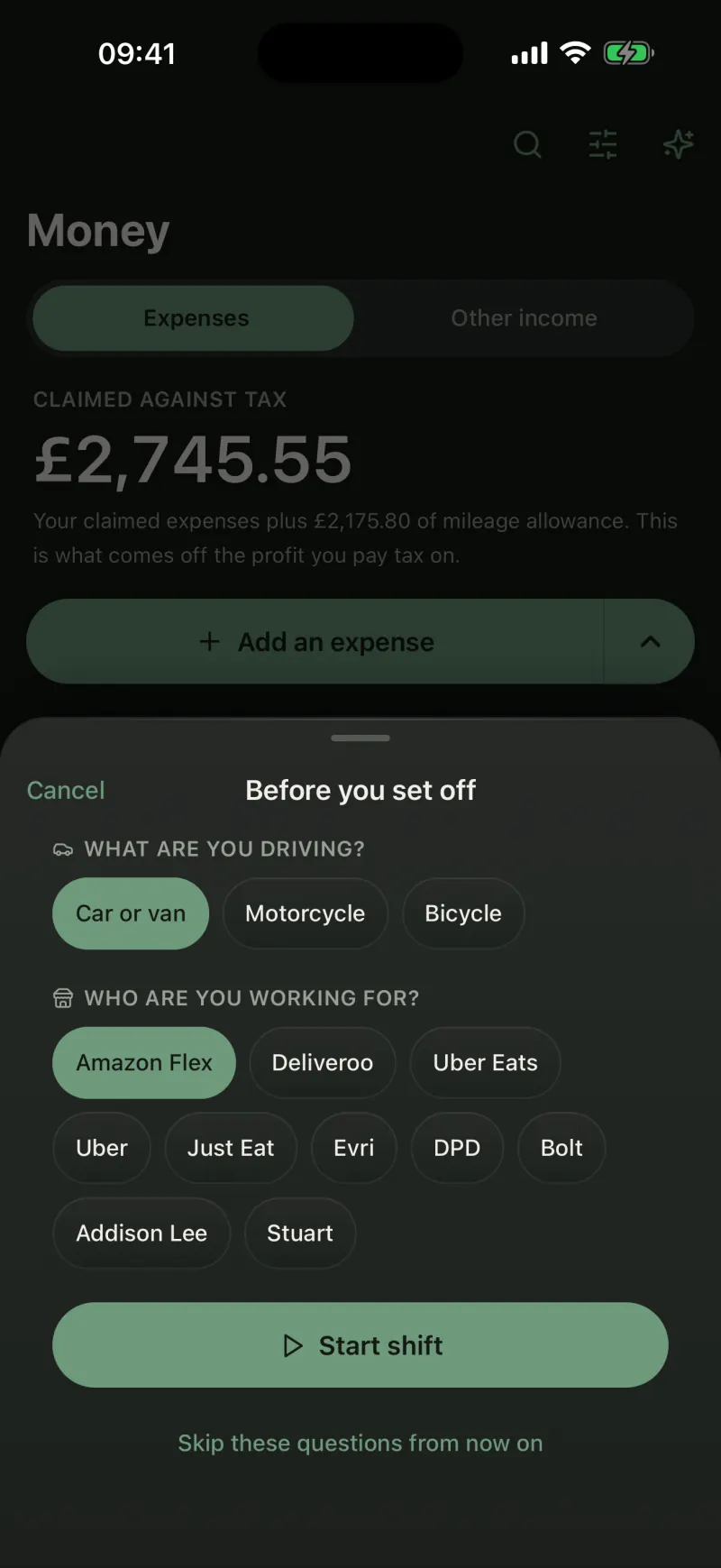
01 · Start shift
One tap when you set off
Pick the platform once and tap Start shift. The time and the nearest postcode are noted for you, before you have left the car park.
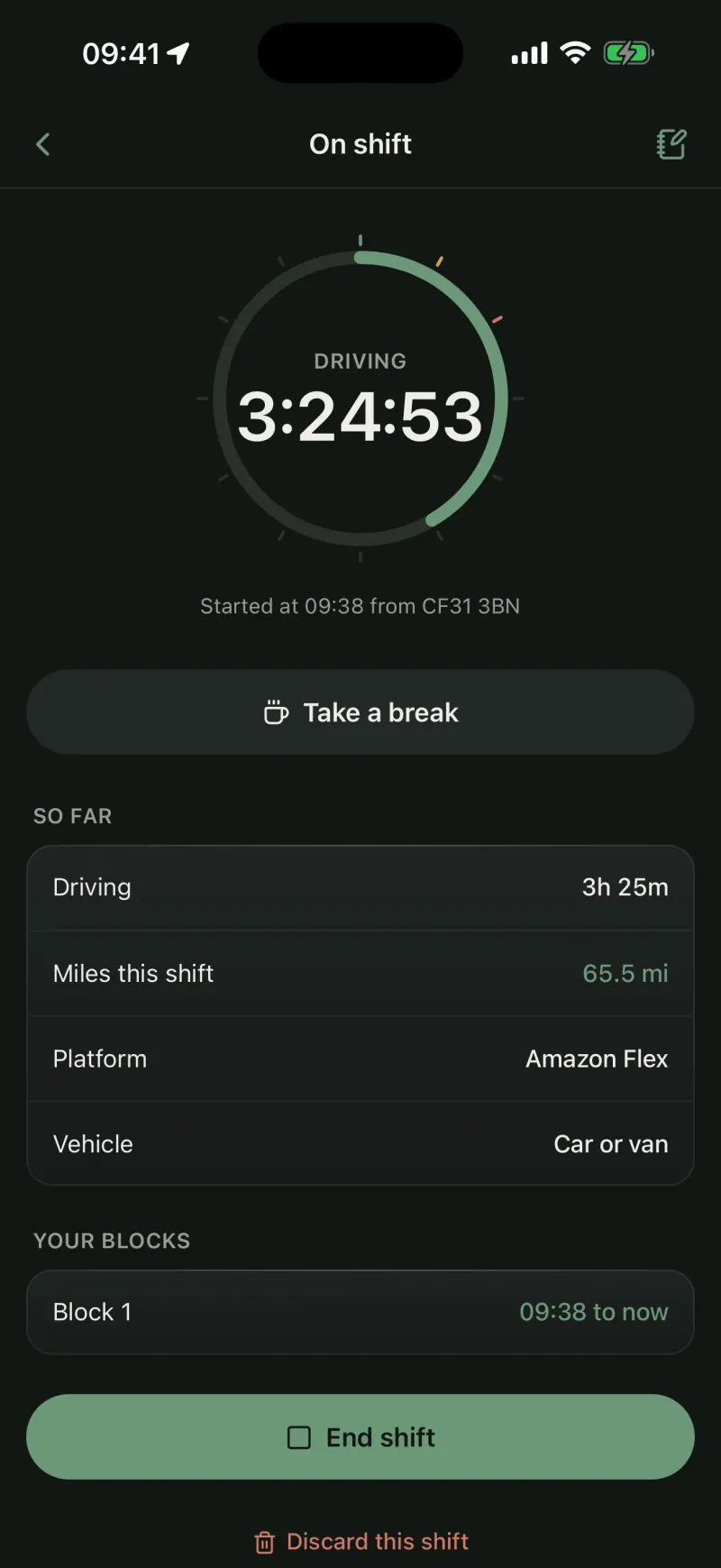
02 · On shift
Your miles, counted as you drive
The app measures the miles while the shift runs, however long it goes on, with breaks when you take them. A running shift sits on your lock screen, so you never have to open the app to check it.
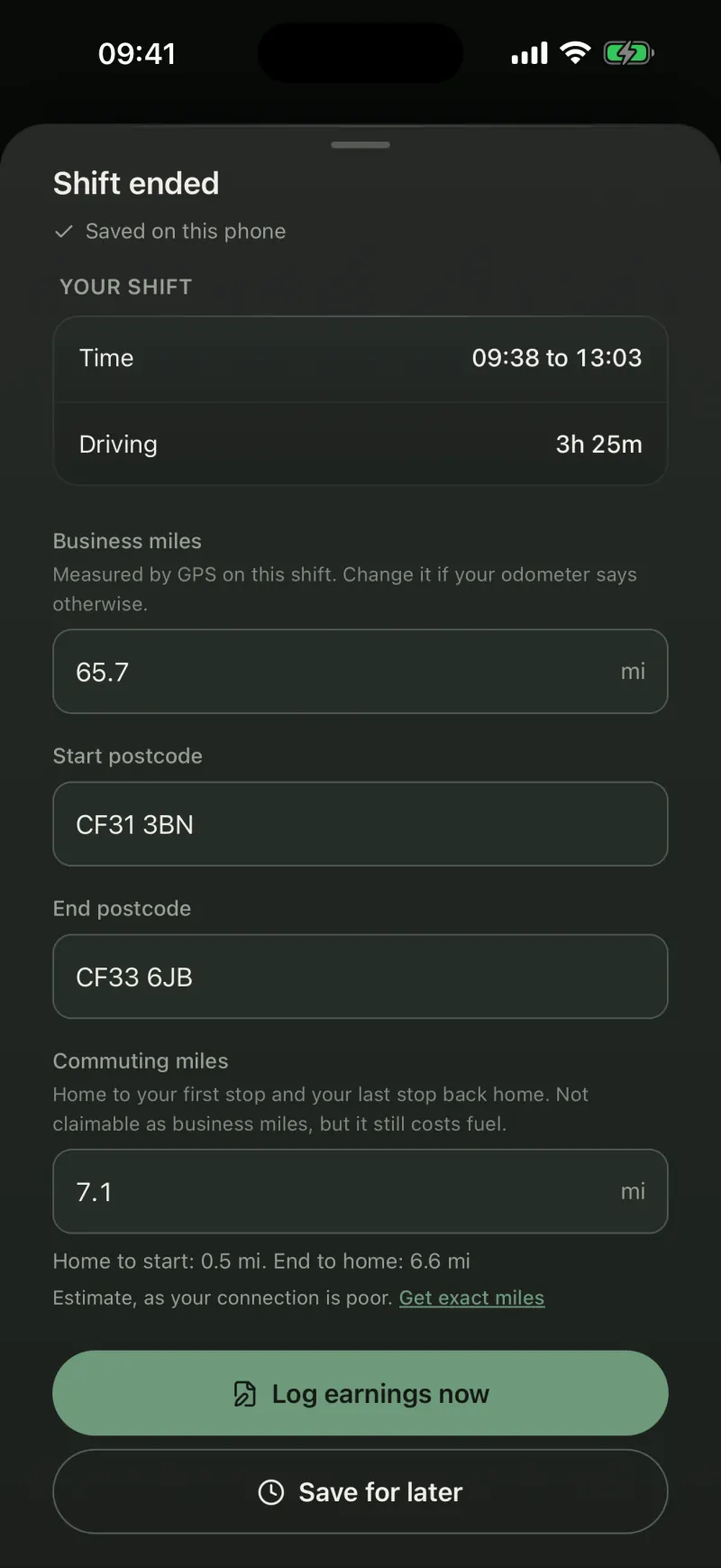
03 · End shift
One tap when you finish
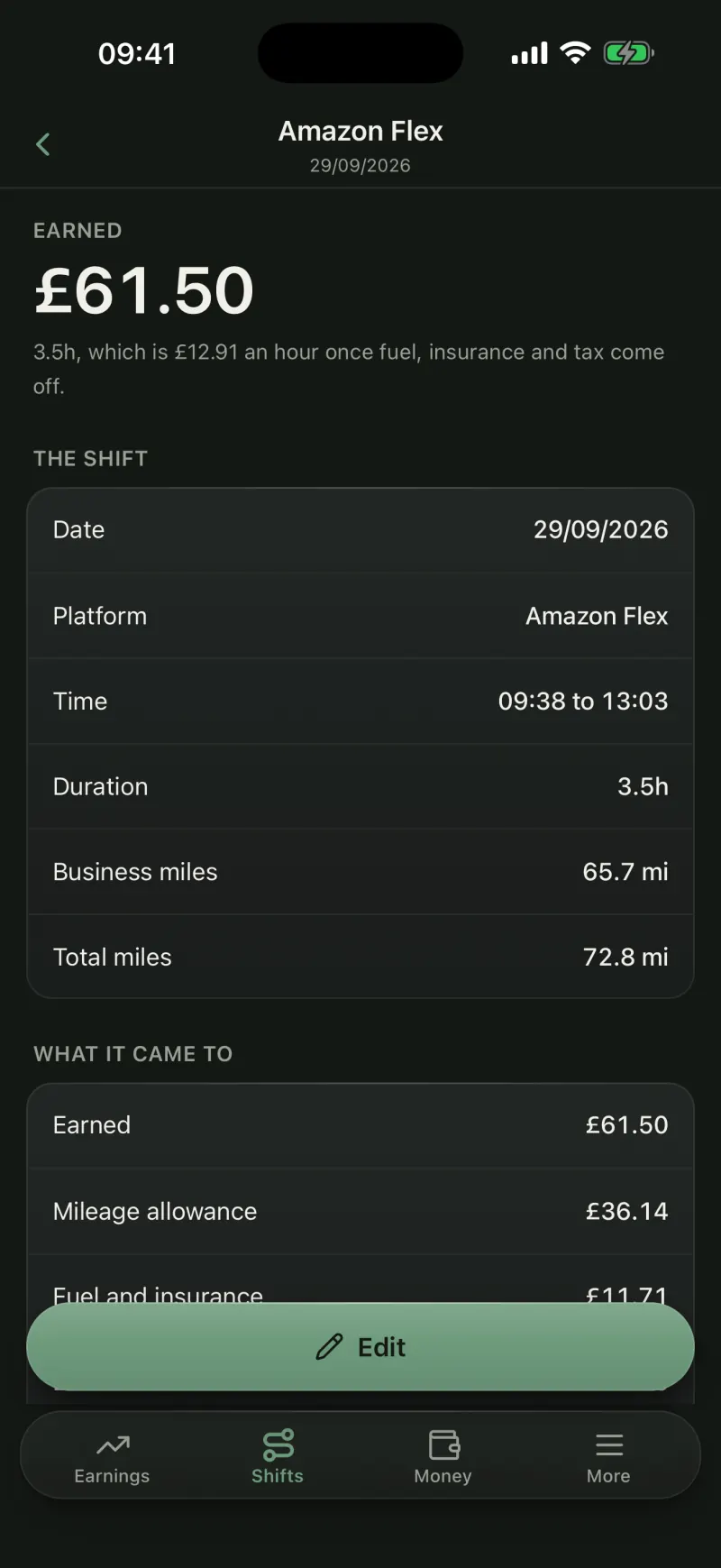
End shift fills in the business miles, the end postcode and your commute home. Change any of it if your odometer says otherwise.
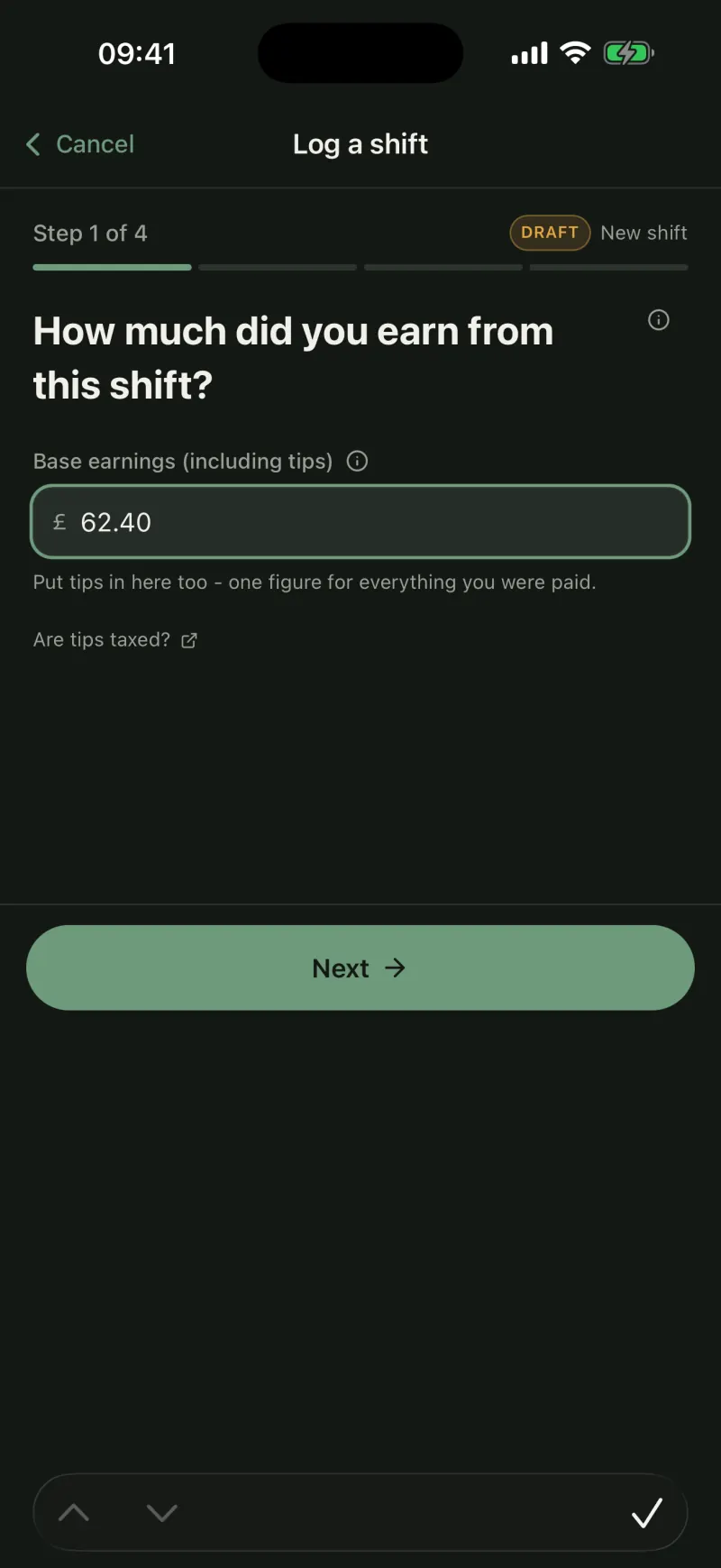
04 · Shift wizard
Then it asks the one thing it cannot know
What the shift paid. A couple of quick questions after that, and the shift is logged. An unfinished one is kept as a draft.
05 · Earnings
What the hour was actually worth
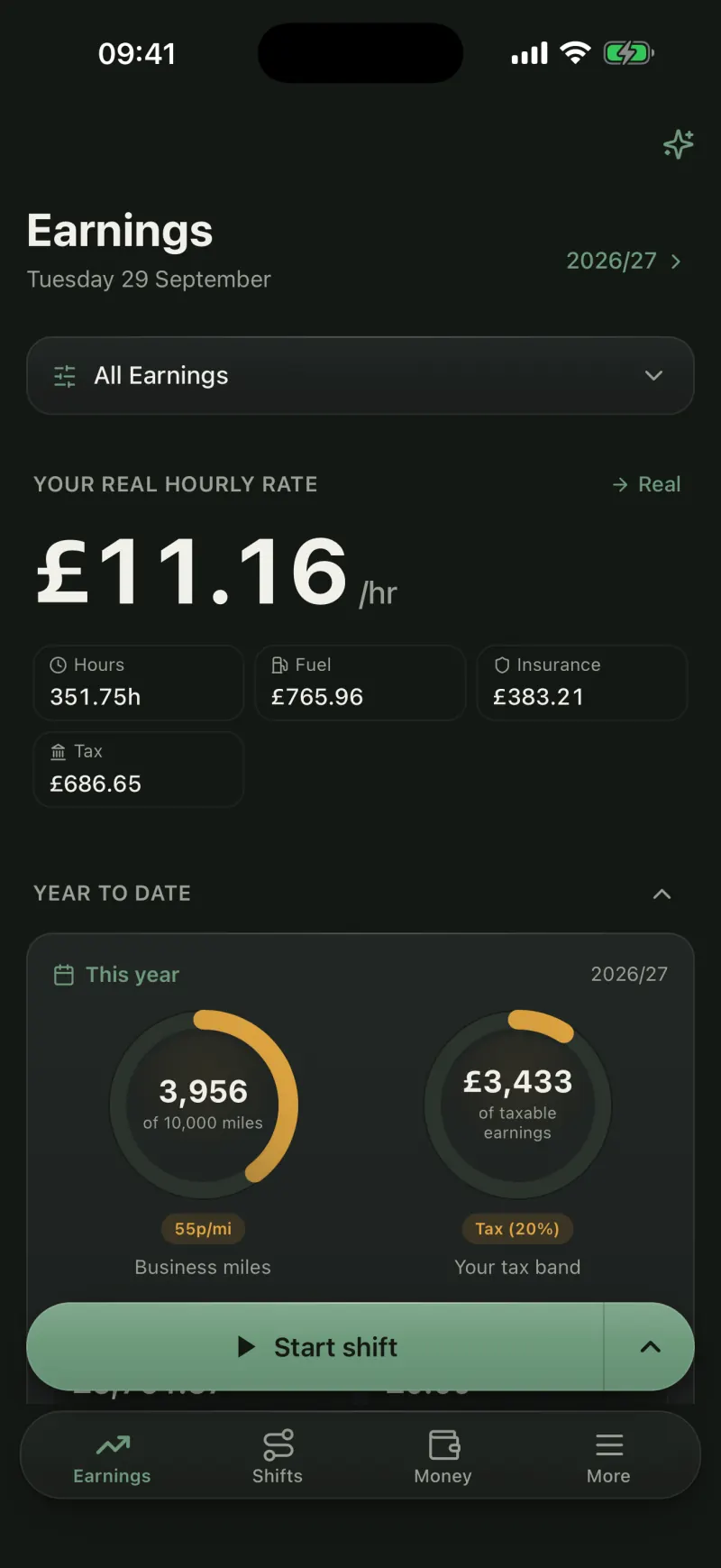
Your real hourly rate after fuel, insurance and tax, across every platform you drive for, updated the moment a shift is saved.
06 · Mileage
Mileage at HMRC's approved rate
55p a mile for your first 10,000 business miles, then 25p, worked out on every shift. Commuting is recorded apart, because it is never claimable.
07 · Expenses
The receipt goes on the expense
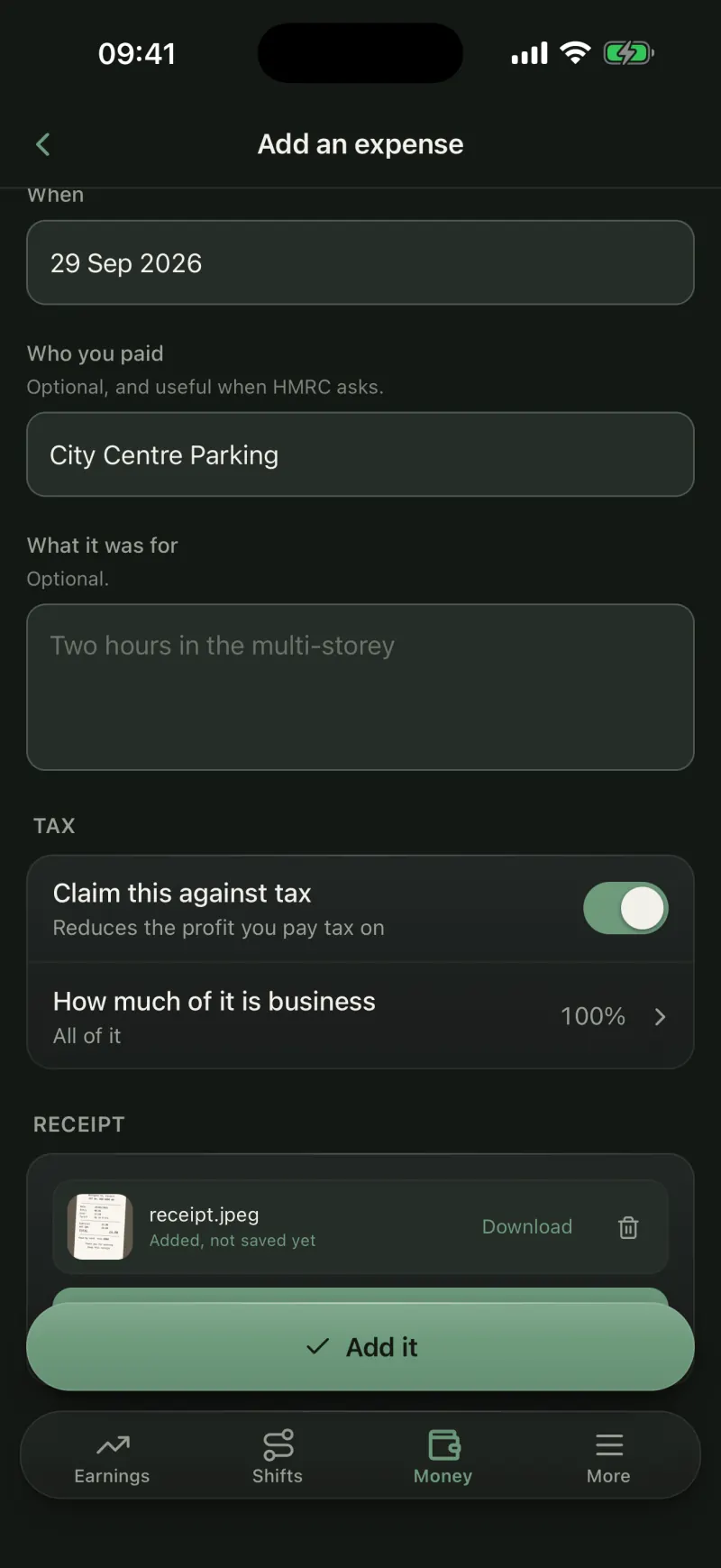
Photograph it as you pay. Parking, phone, kit: each one marked claimable or not, and the claimable ones taken off your taxable profit.
08 · Self Assessment
Your figures, ready for January
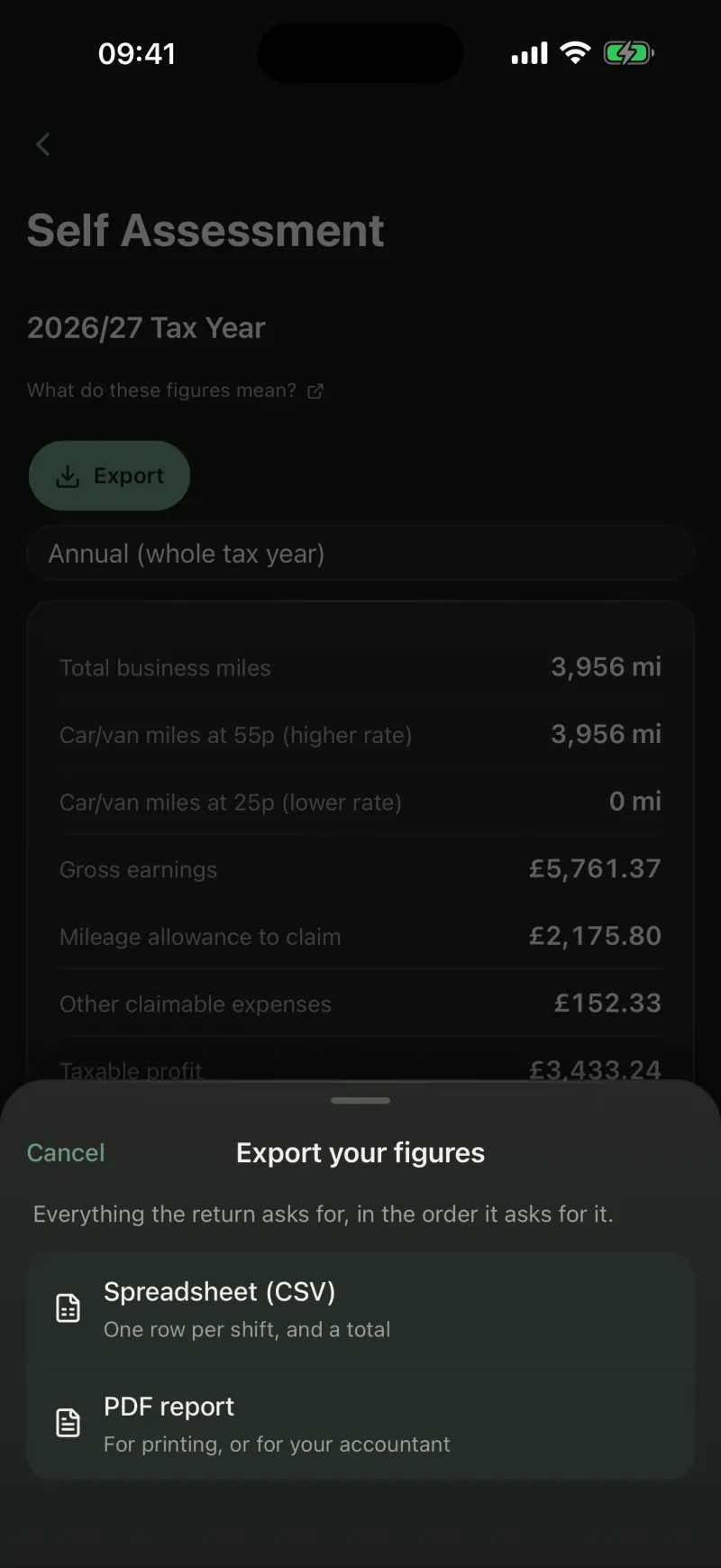
Turnover, mileage allowance, expenses and estimated tax for the year, exported as a spreadsheet or a PDF for you or your accountant.
01 · Start shift
One tap when you set off
Pick the platform once and tap Start shift. The time and the nearest postcode are noted for you, before you have left the car park.
02 · On shift
Your miles, counted as you drive
The app measures the miles while the shift runs, however long it goes on, with breaks when you take them. A running shift sits on your lock screen, so you never have to open the app to check it.
03 · End shift
One tap when you finish
End shift fills in the business miles, the end postcode and your commute home. Change any of it if your odometer says otherwise.
04 · Shift wizard
Then it asks the one thing it cannot know
What the shift paid. A couple of quick questions after that, and the shift is logged. An unfinished one is kept as a draft.
05 · Earnings
What the hour was actually worth
Your real hourly rate after fuel, insurance and tax, across every platform you drive for, updated the moment a shift is saved.
06 · Mileage
Mileage at HMRC's approved rate
55p a mile for your first 10,000 business miles, then 25p, worked out on every shift. Commuting is recorded apart, because it is never claimable.
07 · Expenses
The receipt goes on the expense
Photograph it as you pay. Parking, phone, kit: each one marked claimable or not, and the claimable ones taken off your taxable profit.
08 · Self Assessment
Your figures, ready for January
Turnover, mileage allowance, expenses and estimated tax for the year, exported as a spreadsheet or a PDF for you or your accountant.
Gig apps show gross earnings. JoltMile shows what reaches your account.
After fuel, insurance and tax the real figure is very different. Most drivers never see it, and arrive at Self Assessment guessing. JoltMile does the arithmetic, using the actual HMRC rules.
Your true hourly rate
Every shift gives you gross, after-costs and after-tax pay per hour, so you can tell a good day from a busy one.
Costs you can see
Fuel from your own MPG and the current UK average price. Insurance spread across the driving it covers. Nothing guessed.
Tax ready, not tax panic
Mileage allowance and allowable expenses tracked all year, with your Self Assessment figures waiting when you need them.
Built for how delivery driving actually works
Multi-app by default
Amazon Flex on Monday, Uber Eats on Friday, Evri in between. One record of the lot, and a per-platform view when you want to know which one is worth your evening.
UK rules, not generic ones
Approved mileage rates, the 10,000-mile change, the personal allowance and Class 4 National Insurance, set up for the UK, in pounds, on the UK tax year.
Works without signal
A depot car park with no bars is not a problem. Shifts are saved on your phone and sync when you are back on data.
Your data, exportable
Backups, spreadsheets for your accountant, and deletion that actually deletes. Log in on the website to download any of it from a computer.
The Knowledge Centre
Plain-English answers on tax, mileage, expenses, insurance and the delivery platforms, plus help pages explaining exactly how JoltMile works out each figure. Free, and open to everyone whether you use JoltMile or not.
Common questions
Yes. JoltMile is an app for iPhone, on the App Store now, with Android coming to Google Play. The website is where you can export your figures, add expenses from a computer and look after your account.
Tap Start shift when you set off. The app notes the time and the nearest postcode, and measures your miles while the shift runs. Tap End shift when you finish and it fills in the end postcode and the miles, then asks what the shift paid. You can take breaks in between, and a running shift shows on your lock screen.
Miles driven while working: from your first pick-up to your last drop-off. Home to the depot is ordinary commuting and is not claimable, though it still burns fuel, so JoltMile records it separately.
JoltMile applies 55p per mile for your first 10,000 business miles in a tax year, then 25p after that. It tracks your cumulative miles and applies the right rate to each shift automatically, and each shift keeps the rate that applied on the day you logged it.
Only while a shift you started is running. It measures your miles between Start shift and End shift, then stops. The miles and the postcode at each end are kept, and every raw position is thrown away. The website never asks for your location.
Keep receipts for any expenses you claim on top of your mileage allowance, like parking or phone costs. In the app you photograph the receipt straight onto the expense, and on the website you can drop in receipts that are already on your computer. You do not need receipts for mileage claimed at the approved rate.
No. JoltMile keeps your records and estimates what you will owe so you can plan for it, and exports the figures as CSV or PDF for you or your accountant. You still file with HMRC yourself.
Yes. Every shift, expense and setting is tied to your account and is only readable and writable by you. You can export everything as a backup or a spreadsheet, or delete it all, at any time.
More in the Knowledge Centre FAQs.
Find out what your driving actually pays
Download the app, tap Start shift on your next drive, and look at the real number when you finish.