Deadline reminders
The Self Assessment dates JoltMile tracks for you, how it works out which ones apply, and how to turn them off.
Last checked 12/09/2026.
What it is
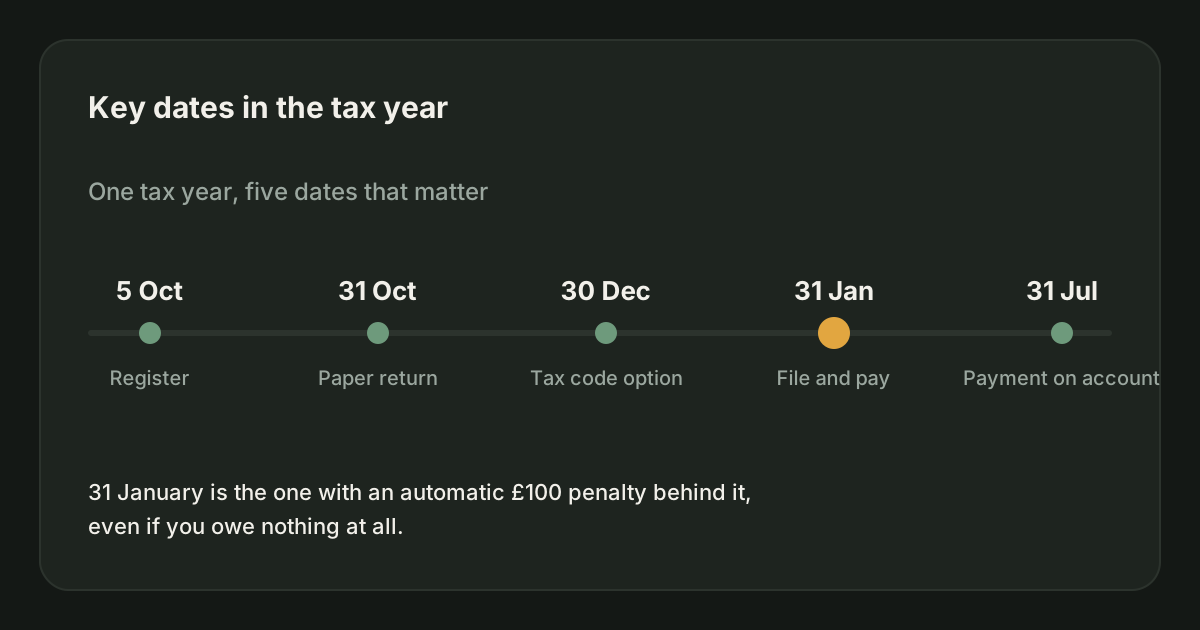
The dates that carry a penalty if you miss them, shown against the tax year you are looking at, under More, then Key dates, in the app, and on Deadlines and reminders in your account on joltmile.com.
What it tracks
| Date | What it is |
|---|---|
| 5 October | Register for Self Assessment, if this was your first year of trading. |
| 31 October | Paper return deadline. Later if you file online, which almost everybody does. |
| 31 January | Online return, the balancing payment, and the first payment on account. |
| 31 July | Second payment on account, if you make them. |
Which of these apply to you depends on the answers you gave during account setup - whether you have registered, whether you have filed before. A driver who has been filing for years is not shown the registration deadline.
Actual reminders, on your phone
The app can put these on your lock screen: seven days before a deadline, three days before, and on the day itself. Only for the dates that carry a penalty if you miss them, which is why the tax year ending and the 30 December coding-out option are deliberately left out. Missing either of those costs nothing.
Everything is scheduled by the phone itself. No deadline, figure or shift is sent anywhere to make a reminder appear, and no notification service is involved. Turn any of it off under More, Settings, then Reminders.
Marking one done
Tick it and it stays ticked for that tax year, then comes back fresh next year - because filing your 2026/27 return says nothing about your 2027/28 one. You can add your own reminders too.
Turning it off
One switch in Settings, Preferences hides the reminders and removes the section from your Earnings tab. The same switch is on Deadlines and reminders in your account on joltmile.com. Your dates are not deleted; turn it back on and they are all there.
What it is not
It is a calendar, not a filing service. JoltMile does not submit anything to HMRC and cannot tell whether you have actually filed - ticking an item records what you have told it.
Related
Self Assessment
Self Assessment is the system HMRC uses to collect tax from people whose tax is not taken at source. You report your income and costs once a year and pay what falls out, by 31 January.
HMRC & taxUpdated 27/08/2026
How JoltMile estimates your tax
Income tax and Class 4 National Insurance on your running profit, using the 2026/27 bands.
HMRC & taxUpdated 29/09/2026
When do I have to pay my tax bill?
By 31 January following the end of the tax year, with a second instalment on 31 July if you are making payments on account.
HMRC & taxUpdated 19/08/2026
What are the penalties for filing late?
£100 the day after 31 January, even if you owe nothing. It escalates from there with daily penalties after three months.
HMRC & taxUpdated 19/08/2026
Riding for Deliveroo: the full guide
How Deliveroo works for a rider: what you need to join, how each fee is worked out, the pay floor agreed with the GMB union, when the money arrives, the insurance Deliveroo gives you for free, and the parts that are left to you.
Getting startedUpdated 29/09/2026
Delivering for Uber Eats: the full guide
How Uber Eats works for a courier: signing up, how each delivery is paid, Quests and batched orders, the weekly pay cycle and the two ways to cash out early, the free Allianz cover, Uber Eats Pro, and the tax side.
Getting startedUpdated 29/09/2026