What HMRC asks for on your return, box by box
Most drivers file the short self-employment pages, which want four things: your turnover, your allowable expenses, your taxable profit, and the dates you traded. Everything else on the form either does not apply or follows from those.
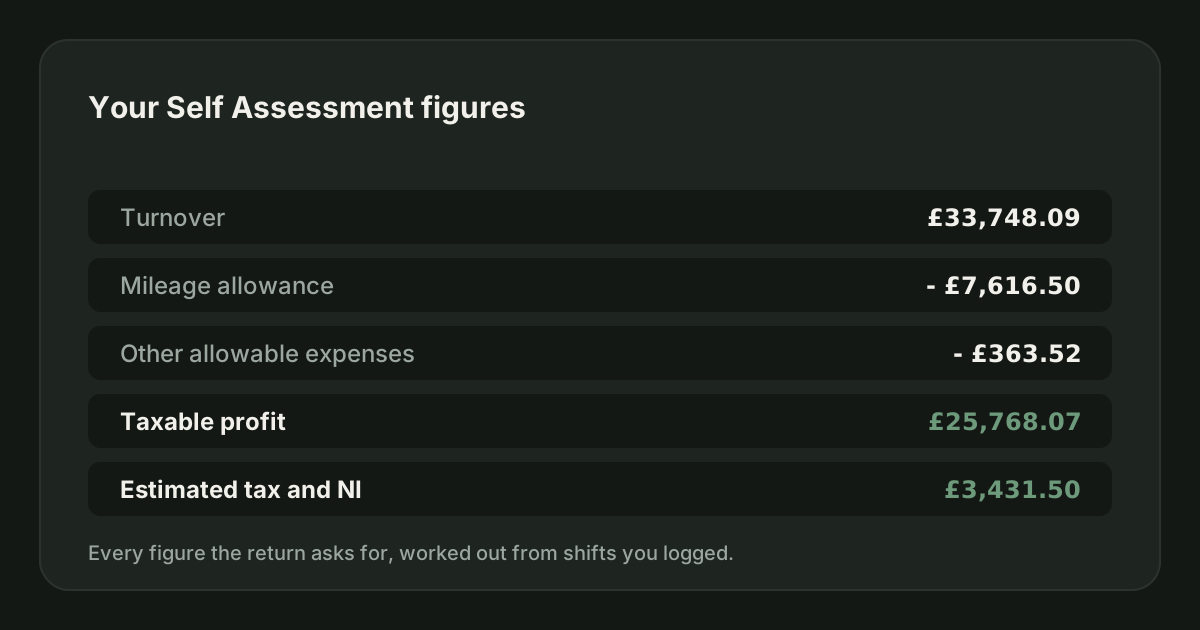
Correct for the 2026/27 tax year. Last checked 12/09/2026.
The form looks worse than it is. Most of it is for businesses that are not yours, and a delivery driver filling in the short pages is entering four numbers.
The four figures
| What the form wants | Where it comes from |
|---|---|
| Business name and description | "Delivery driver" or "self-employed courier" is fine |
| Turnover | Every platform statement for the tax year, gross, added together |
| Allowable expenses | Your mileage claim, plus platform fees, plus anything else genuinely for the work |
| Net profit or loss | Turnover minus expenses. The form works it out |
Getting to turnover
Add the gross figure from every platform for 6 April to 5 April. Not the amount paid into your bank, which is after fees, and not a platform's own annual summary, which runs on its own calendar. Getting your earnings statements out of each app covers the sourcing.
Include tips paid through the app. Include bonuses and promotions. Include anything the platform paid you for doing the work.
Getting to expenses
For a driver claiming the mileage rate, the expense figure is mostly one calculation.
| Line | Example |
|---|---|
| Business miles up to 10,000 at 55p | £5,500.00 |
| Business miles above 10,000 at 25p | £500.00 |
| Platform service fees and commission | £1,840.00 |
| Phone, at the business proportion | £120.00 |
| Parking and tolls on business journeys | £85.00 |
| Total allowable expenses | £8,045.00 |
The order to do it in
- Download every platform statement for the tax year and add the gross figures. That is turnover.
- Total your business miles for the year and apply the two rates to get the mileage claim.
- Add the platform fees and any other allowable costs to the mileage claim. That is expenses.
- Subtract. That is your profit, and the tax and Class 4 follow from it.
- Enter the four figures, check the calculation HMRC shows you, and file.
- Keep everything you used, for the required retention period.
JoltMile produces the turnover, mileage and expense totals for a tax year as one summary, and exports the detail behind them. It does not file the return, and nothing does that for you. Does JoltMile file my tax return is explicit about the line.
Sources
Common questions
- Which self-employment pages do I use?
- The short ones, in almost every case. They are for straightforward businesses under the VAT threshold with no complications, which describes nearly every gig driver.
- Where does mileage go on the return?
- It is not a separate box. The mileage claim is part of your total allowable expenses. On the short pages that can be one combined figure rather than a breakdown.
- Do I enter turnover before or after platform fees?
- Before. Turnover is the gross figure, and the fees the platform took are part of your expenses. Entering the net figure understates both sides.
- What if I worked for four platforms?
- It is one self-employed trade, not four. Add the turnover together, add the expenses together, and report one set of figures.
- What date do I put as my start date?
- The date you first earned from the work, not the date you signed up or passed a check.
About the author
Issac Davies, Founder of JoltMile
Issac Davies drives for gig apps in the UK and built JoltMile to show drivers what a shift actually pays once fuel, insurance and tax come off. Every guide here is checked against HMRC and gov.uk guidance, and is information rather than tax advice.
Track this automatically
Self Assessment summary · CSV and JSON export: the JoltMile app works this out from your own shifts. Your first 10 shifts are free.
Related
Self Assessment for delivery drivers: the complete guide
Registering, what counts as income, what you can claim, how much tax you will owe and when it is due - written for UK delivery and courier drivers, correct for the 2026/27 tax year.
HMRC & taxUpdated 19/08/2026
Getting your earnings statements out of each app
Every platform holds your earnings history somewhere and none of them keeps it forever. Download a statement every month, in the app or on the partner web portal, and keep it outside the app. A deactivated account is an account you cannot get history out of.
HMRC & taxUpdated 27/08/2026
Turnover
Turnover is everything you earned from the work before a single cost comes off. For a gig driver that is the gross figure on the platform statement, including tips and including the fees the platform took.
HMRC & taxUpdated 27/08/2026
Taxable profit
Taxable profit is what you are taxed on: everything the platforms paid you, minus the costs HMRC allows you to deduct. It is almost never the same as what landed in your bank account.
HMRC & taxUpdated 27/08/2026
Renting a PCO car: mileage rate or actual costs?
If you rent your private hire car by the week, you cannot claim both the rental and the mileage rate. Which one to claim depends on the rent, your miles and how much of the week the car works. Here is the arithmetic.
Mileage & expensesUpdated 29/09/2026
The 2026 VAT change on private hire, and what it means for drivers
From 2 January 2026 private hire operators can no longer use the Tour Operators' Margin Scheme, so operators that contract as principal pay VAT on the whole fare. It is a tax on the operator, not on you, but it changes fares and what drivers are offered.
HMRC & taxUpdated 29/09/2026